|
|
请使用QQ关联注册PLM之家,学习更多关于内容,更多精彩原创视频供你学习!
您需要 登录 才可以下载或查看,没有账号?注册
×
+ C& a* L. B9 Q7 N( I. a1 K/ n
5 g* B, v6 k3 x
8 y* Y# P4 L* o* _
Teamcenter BMIDE热部署原理和步骤
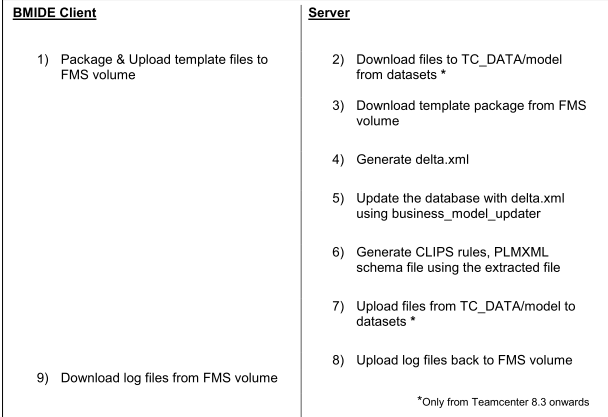
4 \6 A' h3 K) g* W9 k1 C6 C6 xLet‘s understand these steps in detail. * E$ K# w. K- w2 k) [6 L, v
1) Package & Upload template files to FMS volume ! z: i. I0 w) _
a. In this step the BMIDE client will generate the new version of the template package and upload this 9 F$ t) B) }* E1 G0 y# U; j/ F5 {
package to FMS volume using a SOA. * M& w J' D* {) F# |) \+ \0 T
2) Download files to TC_DATA/model from dataset (Applicable from Teamcenter 8.3 onwards) / a& X7 e3 ]) o6 I, m- Z7 H
a. In this step, we download files from the dataset instead of relying on files residing in TC_DATA/model
. V* y0 P5 ?6 d6 X; G$ p& i4 @folder. For details see section titled ―Storage of TC_DATA/model files in dataset‖ 2 K# Z6 L* Z5 W5 |, S( f. ]
3) Download template package from FMS volume
X4 L' [* ?& N/ Z; }/ `( qa. In this step, we download the latest version of the template that the BMIDE client uploaded to FMS O$ u0 o9 q3 n( j Q; @6 C
volume. 7 k+ h( y, E" o& T1 b
4) Generate delta.xml * D2 q) v; s( K# P7 l8 v1 U' l$ P8 d
a. In this step, the delta.xml is generated using the files in TC_DATA/model 0 v0 ?% J4 l1 ?" J1 q$ {$ H+ [) d
i. Copy model.xml to model_backup.xml 2 K9 W" Y4 j, d
ii. Copy model_lang.xml to model_backup_lang.xml 0 Z) T- T- r$ F; O- z
iii. Consolidate template listed in master.xml to model.xml and model_lang.xml
& R- S. }9 k' kiv. Load model_backup.xml and model_backup_lang.xml as old model + D B/ f- [2 x" r8 N/ z
v. Load model.xml and model_lang.xml as new model 5 e" g& B3 D3 |4 `
vi. Compare and generate delta.xml
% P1 f3 E& z+ z0 b O, W
; F. F! N% E4 S+ v' [7 [/ L t ^/ [
b. Teamcenter 8.3 onwards, if any errors occur during this step, we restore all files in TC_DATA/model # t9 o! x; x @
from datasets ( except for model.xml and model_backup.xml)
4 j" i/ x- V6 P1 W. d: l5) Update the database with delta.xml using business_model_updater
5 a/ \- q. g6 G: Z" Y! ea. This is the step where the database is updated with the new data model. The utility
7 ^1 m; B/ y8 F! Y- S/ ^( rbusiness_model_updater updates the database with the contents delta.xml.
% U+ F- W) @3 E/ e. }b. If the update of the database fails, the contents of database will be extracted into model.xml and / c8 K! Y' p) m& h0 k& Z( v
model_lang.xml : U0 @3 o* _0 u( W
6) Generate CLIPS rules, PLMXML schema file using the extracted file
( d) v8 @( ]6 `a. The CLIPS rule file is re-generated if any Condition definitions were updated ' S: h( g0 U6 a
b. The PLMXML XSD is also re-generated ) G. d, {% h# r, t+ O
7) Upload files from TC_DATA/model to datasets (Applicable from Teamcenter 8.3 onwards)
- w! e8 ~9 F; l4 Za. Finally the contents of TC_DATA/model folder are uploaded back to datasets to ensure it is in sync
! B% |3 O: B4 I) V" }9 bwith the database 2 ]7 H. p7 n; `* g
8) Upload log files back to FMS volume : i1 T: e- c5 A. f' s6 ~
a. All deploy log files are uploaded to the FMS volume
+ @# D( j3 y6 f2 S8 U9 f, n9) Download log files from FMS volume * {+ c7 x: l* S3 s6 X$ f: f' K; s- [
a. BMIDE client downloads log files to the client after deployment completes. 7 `9 U }1 ?, [7 b! D
* _! o) z" U: t0 H% @1 r |
|





 发表于 2013-11-25 18:19:57